top of page



Install
The latest version of Stardew Valley (1.6.14) + my mods

Mac version guide
0. Back up the original archive
Open Finder/ Finder, click,
Go » Go to Folder.
Copy and paste this path: ~/.config/StardewValley/Saves.
Submit to open the folder.

Move everything inside.
Save it somewhere else!
Each folder represents one of your archives

2. Developer permissions
Open Settings

Click on Privacy and Security, then Developer Tools

After opening the developer tools, click the + sign in the lower left corner.

Search Terminal/ Open in the lower right corner of the terminal/ Open

3. Install the latest SMAPI
Double-click this in Downloads

Find this and double-click to run

An exclamation mark will appear. Go to Settings > Privacy & Security, scroll down to find the paragraph shown in the picture, click Open Anyway, and then click Open again when the exclamation mark appears.

Enter 1 and press Enter

Enter 1 again and press Enter

再输入2,回车

Green text means the old mod loader was uninstalled successfully!

Close this code interface
Find this and double-click to run (do it again, just uninstalled and now install)

Enter 1 and press Enter
Enter 1 again and press Enter
Enter 1 again and press Enter
Green text means the new mod loader has been successfully installed !

5. Install the latest mod integration package
Open Finder/ Finder, click,
Go » Go to Folder.
Copy and paste this path: ~/Library/Application Support/Steam/SteamApps/common/Stardew Valley/Contents/MacOS/mods
Submit to open the folder.

Drag this folder into the newly opened folder mods

Just like this, there are three files!

6. Add Stardew Valley to shortcuts!
-
打开 Finder/ 访达,点击、
-
Go » Go to Folder.
-
复制并粘贴此路径: ~/Library/Application Support/Steam/SteamApps/common/Stardew Valley/Contents/MacOS
-
提交即可打开文件夹。

Download the icon and drag the downloaded icon from Downloads to the folder you just opened

Search/find StardewModdingAPI in the same folder

Right click StardewModdingAPI
Make Alias

Like this, and then put it somewhere you can open it easily (such as the desktop)

Then right click it and click Get info

Drag the chicken icon in the folder to
StardewModdingAPI alias

That's right!
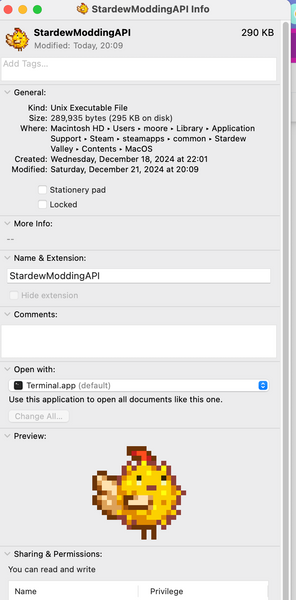
Double-click the chicken on the desktop to start the game!

After each play
You can also close this small window

After adding the chicken to the desktop, you can close all pages and delete all unnecessary files in the download without any malfunction.
7. 因为兼容性问题,第0步保存的老号建议留作收藏,创新号玩
如果需要用我画的红头发肖像,需要起名为 克罗莎 或是 谷小猫
建议新号玩 “边境农场”(Frontier Farm)
8. Hide New Dew Valley from Steam to avoid automatic updates causing program crashes
(Strongly recommended!) (Does not affect achievement accumulation)
打开steam,找到星露谷,右键
(不要双击)

Click Manage ➡️Hide this game ➡️Confirm

PS: Steam's winter sale has started! Go check it out hh

If you don’t understand something, tell me!

bottom of page